
The dashboard
The dashboard serves the records and the cards as a read-only card table on localhost: the table of hands, goals, directions and decks, the lists of cards, each record with its links and back-references, the directions, the artifacts, the tags and the validator’s verdict; each work of the library with its notes, extracts and citing sites, the candidates and the watches and the check.
The tool is scripts/dashboard.py of the dashboard skill (/research:dashboard in Claude Code), one Python 3.11 file on the standard library; the markdown package renders bodies where it is installed, paragraphs otherwise.
This page is the tool: its commands, its pages, what it mounts, how a component is written, and its words.
What it does
It is a renderer and nothing else: every page is the answer of a component’s command with --json, so the page and the command line cannot disagree.
It reads no record or card file itself, writes nothing, serves no path into the library’s store, and re-asks on every request, so a transition run in another terminal shows on the next reload.
The commands
dashboard serves on port 8765 and answers only a request addressed to it by name; its flags:
| Flag | What it does |
|---|---|
--port N, --host ADDR |
another port; --host 0.0.0.0 serves other devices under this machine’s names and addresses |
--allow-host NAME |
another name it answers to, behind a proxy or a tunnel |
--root DIR |
the project, found upward from the working directory otherwise |
--component CMD… |
a command mounted by hand |
--list |
what would be mounted, and nothing served |
dashboard.py --selftest mounts stub components, one with a card and one with none, and renders every view.
The pages
/ goes to the home page of the first mounted component that names one, and, where none does, to the mount of a lone component, or to a page listing the components.
The flow names the table, /flow, and the library none.
The table is the flow’s home page, the zones of flow table in its order, each a heading in the serif, then a row of cards that wraps:
- a hand is its note beside the heading, then its cards and a dashed empty place for each free one where the hand has a limit;
- the goals and the directions are each a row of the open ones face up, the oldest first, with its note beside the heading, no dashed place and no stack, and the two share one wrapping row of their own, right after the hands’ and before the decks; one with none set is its heading and its note;
- a deck is a stack of card backs with the number of its cards on the top one, its note under the stack and a link, The whole deck, to the list of all of it, then its top cards face up; an empty deck is its heading and
no cards; - the two piles are one row under Piles, each a small stack with its count and its note beside it, the whole a link to its list.
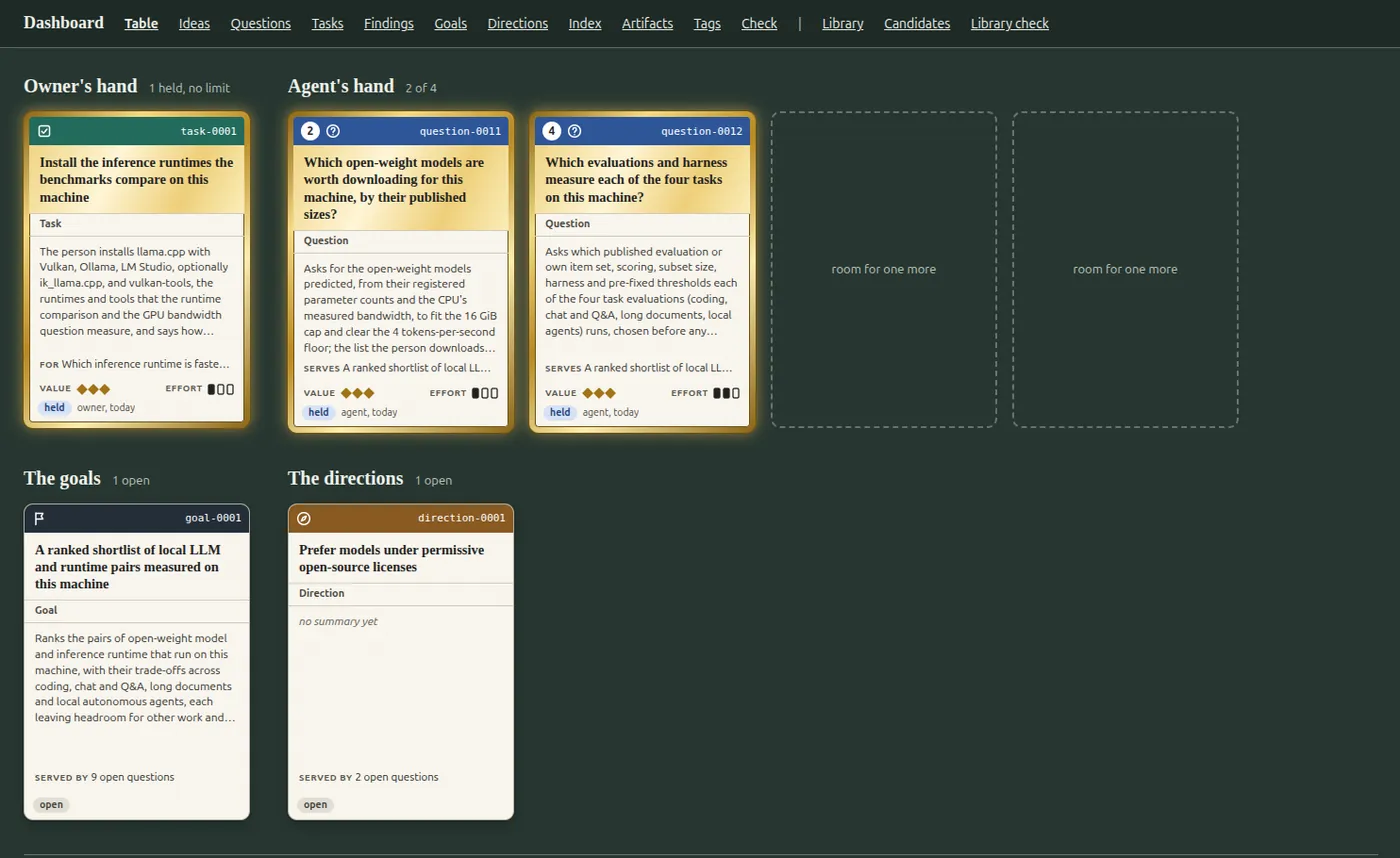
Findings are in no hand and no deck and are reached from the navigation, as cards, and so are the goals and the directions that are no longer open.
A list lays the same cards for the flow’s list route, for the open directions and for the library, under the filter form the route names: a filter with a fixed set of values is a select, any other a text input, and a flag a checkbox.
A component that has not told the dashboard how to lay its records on a card keeps its table of rows.
A record is its card at the left, enlarged, and beside it a paper panel with the title as its heading, the summary whole, the body, and under them the fields the face does not carry; its links and back-references are a row of small cards each, the band with the id and the name of the link, and the title under it.
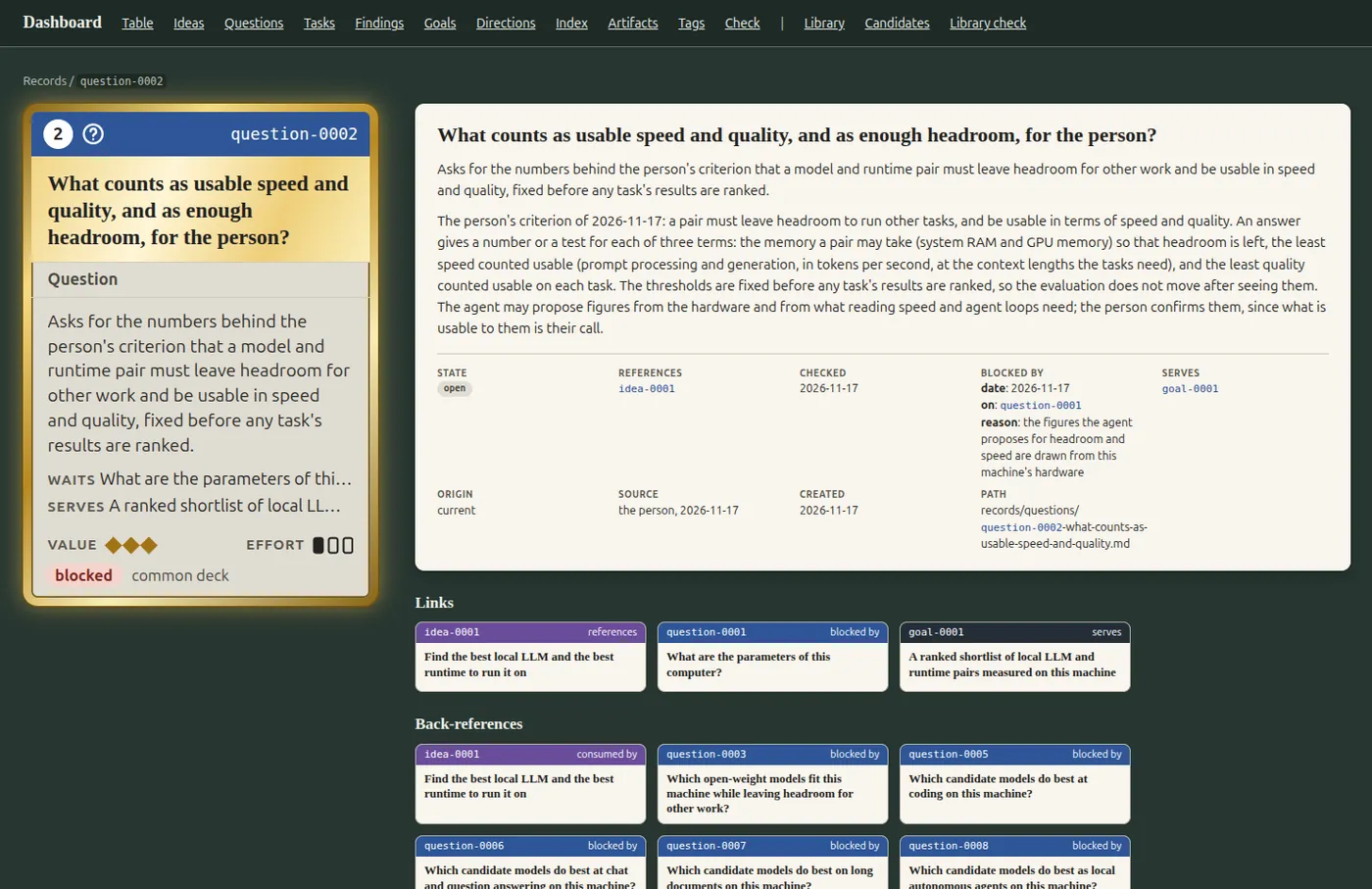
The face is one for every entity, 240 px wide, from the top:
- the band, in the kind’s colour, with the rank in a white pip where the card has one, the kind’s sign and the id;
- the title, whole and never cut, on a plate that takes the value’s look;
- the type line, the kind’s word in bold and the tags;
- the text box, the summary folded to six lines (a folded summary does not unfold in place, the page having no script), and at its foot the first two of the card’s
lines, one line each, withno summary yetwhere the card has a summary field and it is empty; - the parameters where the kind has them, the value as three gems and the effort as three bars, each filled to its level, a parameter not judged three empty outlines in grey; an idea shows value alone, and a finding, a goal, a direction and a work show none;
- the foot, the standing as a badge, then the place.
The value is the card’s strongest signal, and the only place metal goes: a card not judged has a 1 px flat frame, the lowest level the same with one gem, a middle level a silver frame and the highest a gold one; where a project’s levels are more or fewer than three, the first is plain, the last gold, those between silver, and the gems fill in proportion. A parked or a blocked card lies on greyer paper, with its text at the same contrast. The kind is told by its sign and its word as well as its colour: idea, question, task, finding, goal, direction and the library’s work have a face each, and a kind the dashboard does not know has a neutral grey one with no sign. The ground follows the browser’s light or dark setting and the paper is the same in both; nothing on a card moves.
What it mounts
Components are found in this order, the first mount of a name winning: a --component on the command line; dashboard.toml at the project root, with [[component]] tables naming a command list; the skill directories beside the dashboard’s whose component.toml names a command and a bindings file, mounted when the bindings file exists at the project root; the flow and library commands on PATH when their bindings file exists.
So a skill adds its pages to the one dashboard by being installed beside it — in the same skills directory, or as a sibling plugin of the same marketplace — and bound in the project: with flow.toml at the root the records are mounted, with library.toml the cards.
Writing a component
A component is any command that answers <command> --json pages with a page manifest — its mount, its navigation entries, the link patterns that turn an id in any text into a link across components, its home page, the card key that says how a record is laid on a face, and its routes with their views (markdown, lines, list, table, record, tables, check) — and every other page as <command> --json <subcommand> ….
The skill’s references/protocol.md is the manifest’s shape; a component ships a component.toml beside its SKILL.md naming its command relative to the skill directory and the project’s bindings file.
Words
- component — a skill whose CLI answers
--json pages, which the dashboard mounts. - table — the flow’s home page: its zones laid out as hands, the goals and the directions, decks and piles of cards; also the
tableview a component’s route may name. - zone — one place of the table, a hand, the goals or the directions, a deck or a pile, the dashboard laying it from the component’s own
zones: its title, its count, its note, its free places, the query that lists all of it and the cards on top. - face — what one entity looks like as a card, laid from the component’s
cardkey: one of seven,idea,question,task,finding,goal,directionorwork, or a neutral one.